
Download Youtube MP3
 facebook.com
 instagram.com
 tiktok.com
 twitter.com
 threads.net
 soundcloud.com
 reddit.com
 dailymotion.com
 vimeo.com
 vk.com
 xiaohongshu.com
Free YouTube to MP3 Converter - Quick Download Helper Extension
Need to download YouTube audio? The Quick Download Helper extension is your free, powerful solution to easily convert YouTube videos to MP3 files.
Our tool functions primarily as a high-quality YouTube MP3 converter, letting you extract audio tracks effortlessly. Save music, podcasts, lectures, or any YouTube sound directly to your device in the popular MP3 format. While it also supports video downloads, its strength lies in providing clean YouTube to MP3 conversions.
Get the Quick Download Helper extension for a simple and efficient way to save YouTube audio as MP3. Experience reliable, high-quality YouTube MP3 downloads every time on your PC or mobile.

Method 1: Download YouTube videos and music quickly and easily with the Quick Download helper extension.

How to Download YouTube Videos Online (MP4, MP3 & More)
- Go to YouTube.com and copy the URL of the video you want to download.
- (Optional - if the tool requires pasting) Paste the video link into our YouTube downloader.
- Select your desired format to download the YouTube video as an MP4, MP3, WEBM, or 3GP file.
- Click the "Download" button to start saving the video.
Method 2: Download YouTube Videos Online Without Software: Use the SS Trick
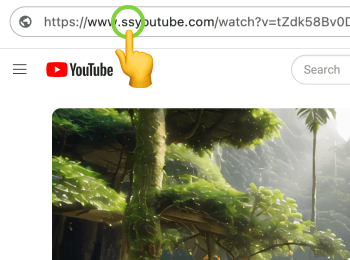
Want to download YouTube videos directly without installing browser add-ons or software?
- Go to the YouTube video you want to download.
- In the browser's address bar, add "ss" right before "youtube.com" in the video's URL.
- Press Enter. You'll be redirected to an online YouTube downloader.
Method 3: Download YouTube Videos Online: Use the Prefix Method
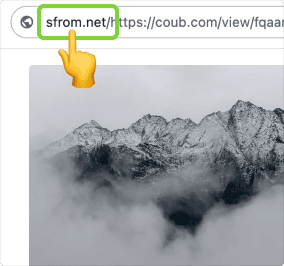
Universal Video Downloader: Save Videos from Nearly Any Web Page
- Navigate to the web page containing the video you wish to save.
- In your browser's address bar, add prefix directly before the page's full URL.
- Press Enter. You'll be redirected to online Youtube downloader.
Method 4: Download YouTube Videos Using Quick Download
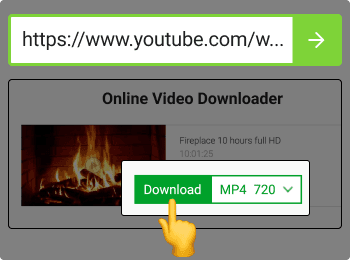
Quickly download YouTube videos with these steps
- Open the Quick Download website in your browser.
- Go to YouTube, find the video you want to download, and copy its full URL from your browser's address bar.
- Return to downloader website and paste the copied YouTube URL into the prominent input field.
- Click the "Download" button. Downloader website will process the link.